Training Tilt
Start for free

Create Social Posts from Athlete Data Using AI and Your Coaching Platform

Cam LangsfordJuly 23, 2026

In this demo, I’m showing another way coaches can use the new Training Tilt MCP integration with ChatGPT or Claude.

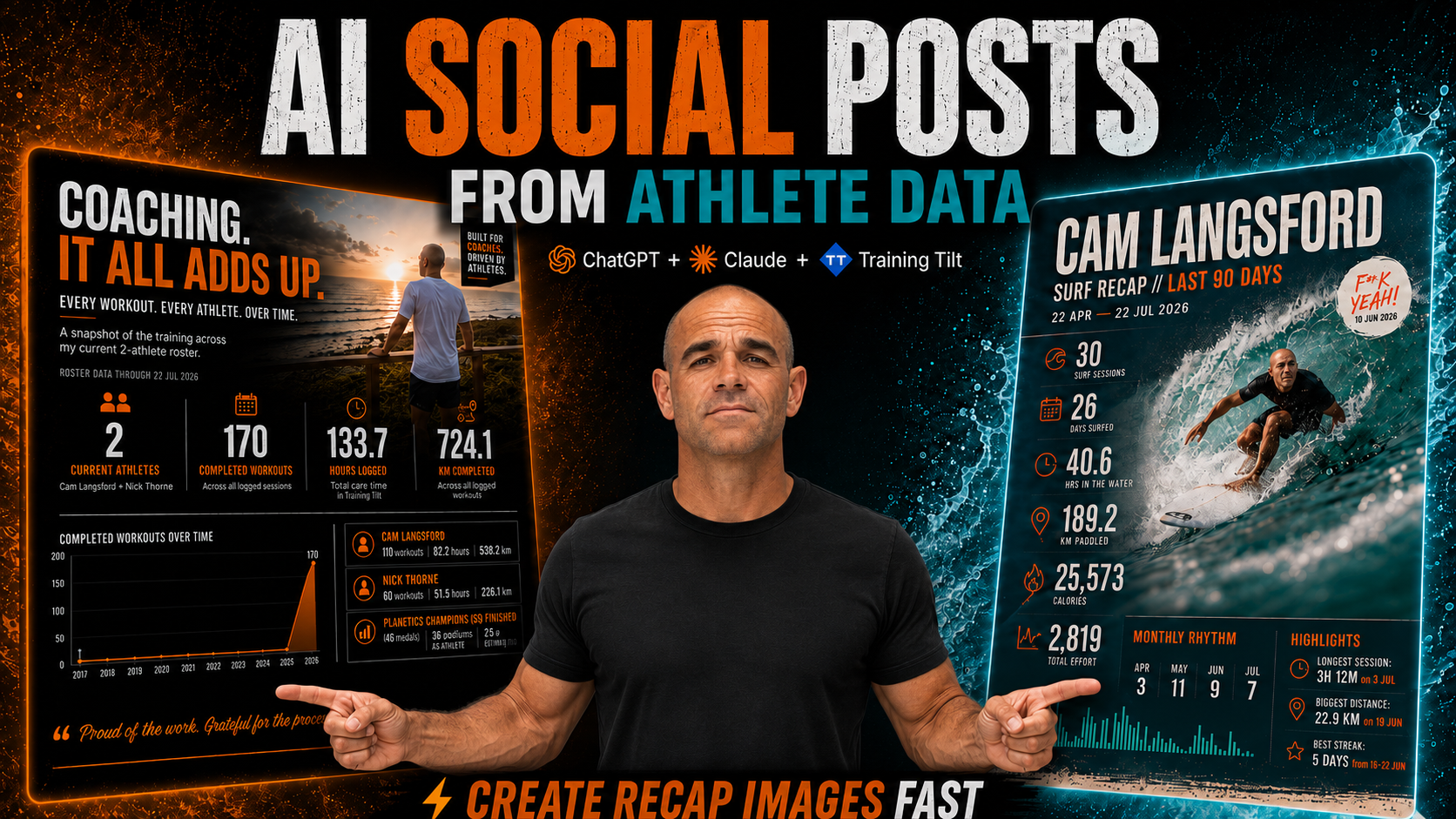
This time, instead of analyzing training or building workouts, I’m using athlete data to create shareable social media graphics.

First, I pull up my own athlete profile and ask ChatGPT to create a Strava-style recap using just my surfing activities from the last 90 days. It pulls the training data directly from Training Tilt and turns it into a visual showing things like:

🏄 Surf sessions
🌊 Days surfed
⏱️ Hours in the water
📍 Distance recorded
📈 Training trends and highlights

Then I take it a step further and create another graphic that combines the training data across my coaching roster, showing the total workouts, hours, distance and completion data for the athletes I coach.

Watch the video version on Youtube.

The main point is that once your AI assistant has access to your Training Tilt data, you’re not limited to a fixed set of reports or dashboards. You can use your own ideas and prompts to create whatever is useful for your coaching business, whether that’s athlete recaps, social content, coaching summaries, motivation posts or something completely different.

Training Tilt coaches can request their MCP credentials from:

Settings → MCP Credentials

Not using Training Tilt yet? You can start a free trial here:

https://trainingtilt.com/signup

Training Tilt is an all-in-one platform built specifically for endurance coaches, combining training delivery, athlete management, payments, memberships, websites and more.

Training Tilt AI

Cam Langsford

Enthusiastic age group triathlete, software architect and founder of health and fitness community platform "Training Tilt".

Take our Free "Authentic" Marketing Course for Coaches

Designed for endurance sport coaches. Marketing doesn't need to be pushy. The best marketing simply creates a win-win relationship between you and your customers. Take the simple 6 part course to learn more.

Take the course via email

Training Tilt Works with

Frequently Asked Questions

How do I get started?

Click Get Started or Free Trial, choose a plan, and fill in the form. As soon as you have signed up, your new Training Tilt site is ready.

Are there any long term contracts?

No. You can cancel a Training Tilt subscription at any time.

Do my clients also have to pay for an account?

No. Training Tilt does not charge your athletes. You can still collect recurring payments from them with Membership Plans.

Can I upgrade or downgrade my account?

Yes. Plans are calculated daily, so you can move between plans and only pay for the days you use.

How do I login?

Log in at the custom address you chose when you signed up, in the form http://yourbusiness.trainingtiltapp.com. If you cannot find that email, contact support@trainingtilt.com.

Is it possible to use my existing website domain name?

Yes. You can point an existing domain at your Training Tilt website, or use a Training Tilt subdomain such as http://yourbusiness.trainingtiltapp.com.

I already have a website. Can I still use Training Tilt?

Yes. Keep your current website and link clients through to your Training Tilt site for training plans and resources.

Is there a mobile app?

Yes. The apps are on the Google Play Store and the Apple App Store.

Where will my data be stored?

Training Tilt runs in Microsoft data centers. Data is backed up regularly, and the service can scale as demand grows.

What if I need to cancel?

Log in, open billing, and cancel. Cancel before the next billing cycle starts and you will not be charged for that cycle.

More questions?

Get in touch

Copyright © 2026 Training Tilt